
Designing in Code
How AI closed the gap between design and everything else
I didn't wait for the design process to catch up with AI. I rebuilt my practice around it, using AI-assisted coding to create functional prototypes, ship practice infrastructure, and do work that Figma alone can't support.
AI product designer
Scope
Personal practice evolution and applying across all Cisco projects 2024–2026
Tools
Cursor, Claude Code, VS Code, Figma MCP, Cisco AI Assistant API, Meraki OpenAPI, XDR client URLs
About
There's a frustration most designers know well: fighting for a seat at the table where product decisions actually get made.
For years, the tools available to designers worked against that fight. We designed in Figma. Engineers built in code. The handoff was a translation process, and something always got lost. Developers learned to read designs in dev mode, but design stayed isolated from how products were actually built.
Then AI-assisted coding arrived. For the first time, the gap between how designers think and how products get built became small enough to step across. I stepped across it. This is what I learned on the other side.
Strategy
The standard case for designing in code is about fidelity: coded prototypes test more accurately and reduce handoff errors. True, but it misses the bigger shift.
The real change is about ownership. When a designer builds a functional prototype with live data and real APIs, they're not presenting a vision for engineers to interpret. They're demonstrating a reality for stakeholders to react to. The prototype becomes the argument, and when it's running on real data, behaving the way the actual product will behave, the designer's influence over product decisions changes.
This matters even more for AI products. AI experiences are shaped by probabilistic behavior: the same input can produce different outputs, agents behave differently across contexts, and the interface is often the quality of a response or the logic of a recommendation. Static mockups can't capture any of that. Code can. Designing in code isn't a technical skill. It's the only way to work honestly with how AI products actually behave.
Process
For the Cisco AI Defense homepage and app experience, I gathered all available product context such as PRDs, blog articles, SME and TME call transcripts, competitive product analyses, and data storytelling best practices and used AI to synthesize that material directly into design decisions. Rather than moving from research to insight to brief to wireframe in a linear sequence, I collapsed those phases: the synthesis was the design process. The resulting homepage and agentic AI app experience were well received by stakeholders not because they looked polished, but because they were grounded in the product's actual logic and language in a way that traditional research-to-design hand-offs rarely achieve.
Synthesizing research into design for Cisco AI Defense
Cisco AI Defense home screen
For the AI Canvas experience, I built a fully working prototype rather than a static mockup. I connected Cisco's internal AI Assistant API so the Canvas Assistant generated UI tiles dynamically, not simulated. I used Meraki's OpenAPI and XDR to populate the canvas with real data. Stakeholders and engineers could interact with it as if it were a live product, moving feasibility conversations from late in development to early, when they're cheap to answer.
Vibe-coding AI Canvas with live data for Unified AI Assistant
One of the less visible but most consequential applications of designing in code was the AI UX Playbook content hand-off to engineering. Rather than delivering documentation in human-readable formats, I structured the Playbook's principles, moments, and guidance in files and formats optimized for AI consumption, the kind of structured, consistent, machine-parseable content that an LLM can reason over reliably.
That decision made it possible for the engineering team to build the AI UX Playbook MCP Server and its seven tools without extensive back-and-forth interpretation of design intent. The design artifact was the engineering input. That's a different relationship between design and engineering than most teams have ever experienced.
Structuring knowledge for the AI UX Playbook MCP Server
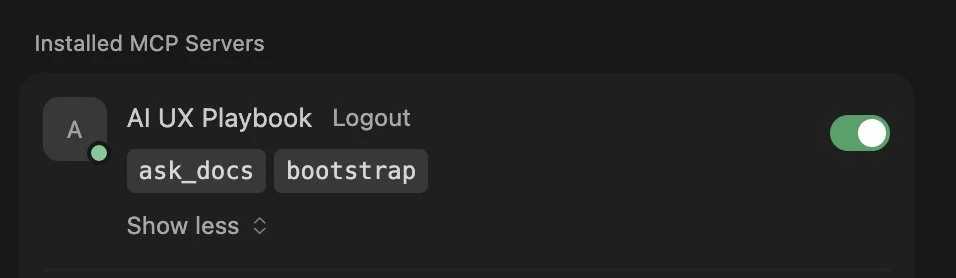
Using the MCP Server and tools I'd helped structure, I built the AI UX Playbook Agent and deployed it Cisco-wide through Cisco's internal AI Assistant and Agent Studio. A design knowledge system that started as a collection of markdown files became a queryable, conversational agent available to every designer, PM, and engineer at Cisco. Design knowledge, made executable.
Deploying a company-wide AI UX Playbook Agent
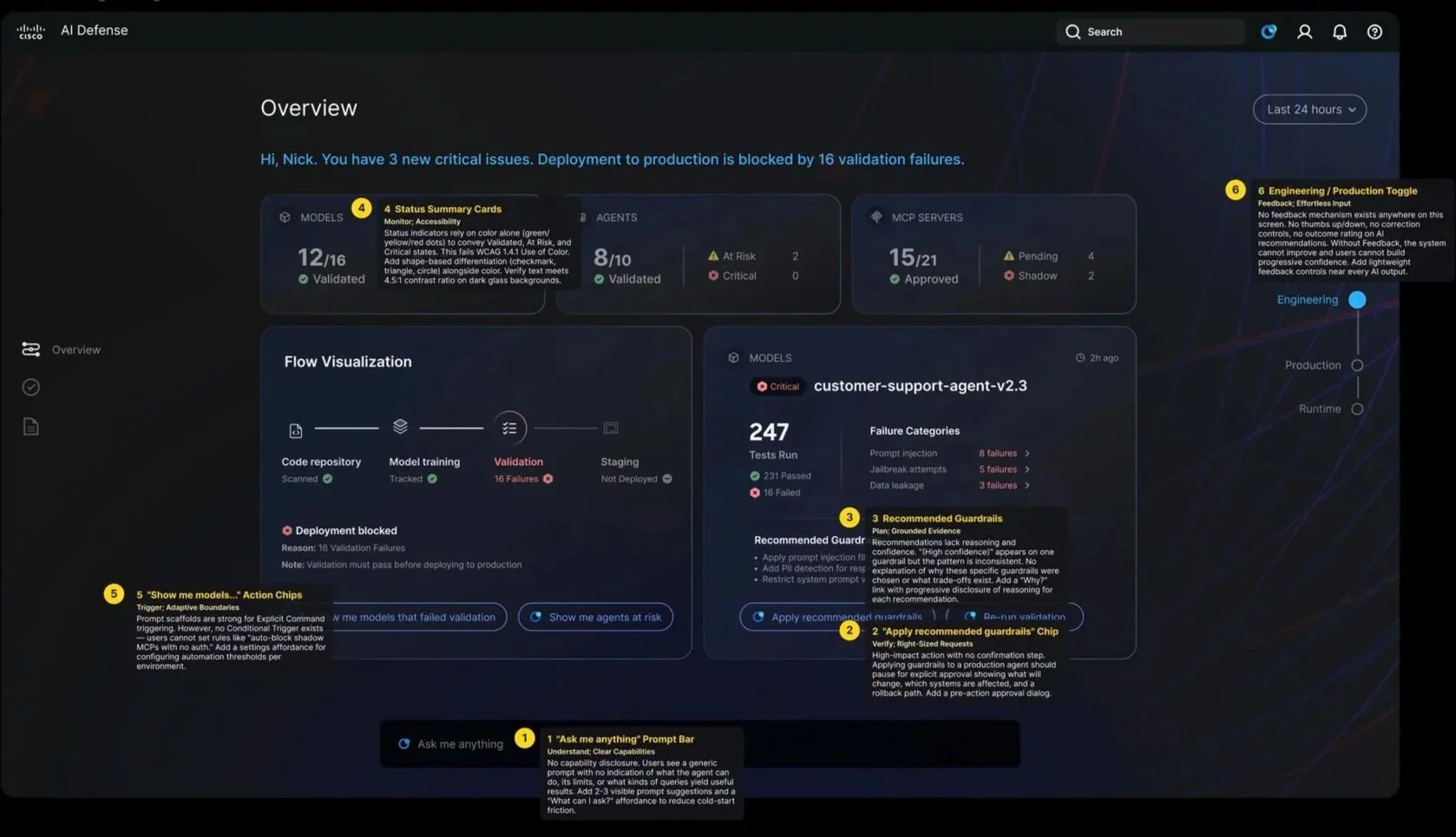
I built a Cursor-based skill combining the Figma MCP and AI UX Playbook MCP. It reads Figma frames, evaluates them against Playbook guidance, and adds annotations directly on components in the Figma canvas. The output covers how well Trust, Agency, and Quality are applied, which Agentic Moments are present and how effectively they are represented, accessibility gaps if any, what's working well and what needs improvement, and what the designer should do as actionable next steps. Design critique at scale, embedded where design already happens.
Design review skill using Figma MCP + AI UX Playbook MCP
Improvements
1
The first instinct with AI-assisted coding is to try to control the output, to specify exactly what you want and treat the AI as a smarter Figma. That produces mediocre results. The pivot was learning to design with the AI, treating generated code as a first draft that surfaces the real design questions, not a deliverable to polish. The best moments weren't when the AI got it right immediately. They were when it got it wrong in an interesting way that showed me something I hadn't considered.
2
The second pivot was about letting go of the code. Early on I treated coded prototypes as assets to maintain. The right mental model is that they're thinking tools, built to answer a question, then discarded. The value isn't in the code. It's in what building it taught you.
Outcomes
Every project in this portfolio was shaped by designing in code. The AI Canvas prototype moved engineering alignment faster. The Playbook MCP handoff removed a translation layer between design intent and implementation. The Design Review Tool turned a practice that required a senior designer's attention into something that runs on demand, for any team, against any Figma file.
The broader outcome is harder to measure but more important: a design practice that no longer stops at the edge of what Figma can represent. When the product is an AI system shaped by probabilistic behavior, adaptive, operating across domains, reasoning across context, the design work needs to match. Code makes that possible in a way that pixel-perfect mockups never will.
For designers who've spent years arguing for a seat at the table: this is how you stop arguing and start demonstrating.
Reflections
Start earlier and expect less of yourself at the beginning. My first coded prototypes were rough, and I spent too much time feeling like I was doing it wrong. The learning curve for AI-assisted coding is real, but it's much shorter than for traditional coding, and it closes faster than it feels like it will in the first week. The more useful frame: treat the first ten projects as tuition, not deliverables. The skill builds quickly once you stop measuring each attempt against production-quality output.